
It’s true you never get a second chance to make a first impression, and that statement applies to events and fundraisers, too! While you’re planning a terrific time for guests, they won’t actually get to experience it until the day of. Until then, you have to do your best to represent your event at every touchpoint people encounter.
Every Event Needs a Landing Page
Perhaps one of the most critical places to make a good impression is on your event page. Whether you’re hosting a small open mic night, a battle of the bands, or a huge gala, your event page is likely the first place people will interact with your event! If you don’t capture interest or make it easy to buy tickets, you’ll miss out on sales.
Lots of people use Facebook events, which definitely has its place. However, it can be limiting. Some food for thought:
- Not everyone uses Facebook —if someone wants to attend, they have to sign in.
- You don’t have access to attendee information or marketing analytics.
- sell-tickets-online isn’t flexible or seamless. Event hosts can only select one price per event on Facebook, and that can’t be changed once you’ve published your event. So, if you want to offer different ticket types (like VIP), bundles, or early bird tickets, that’s a no-go. There’s also no option for selling printed event tickets.
- Your event isn’t searchable by Google and other search engines.
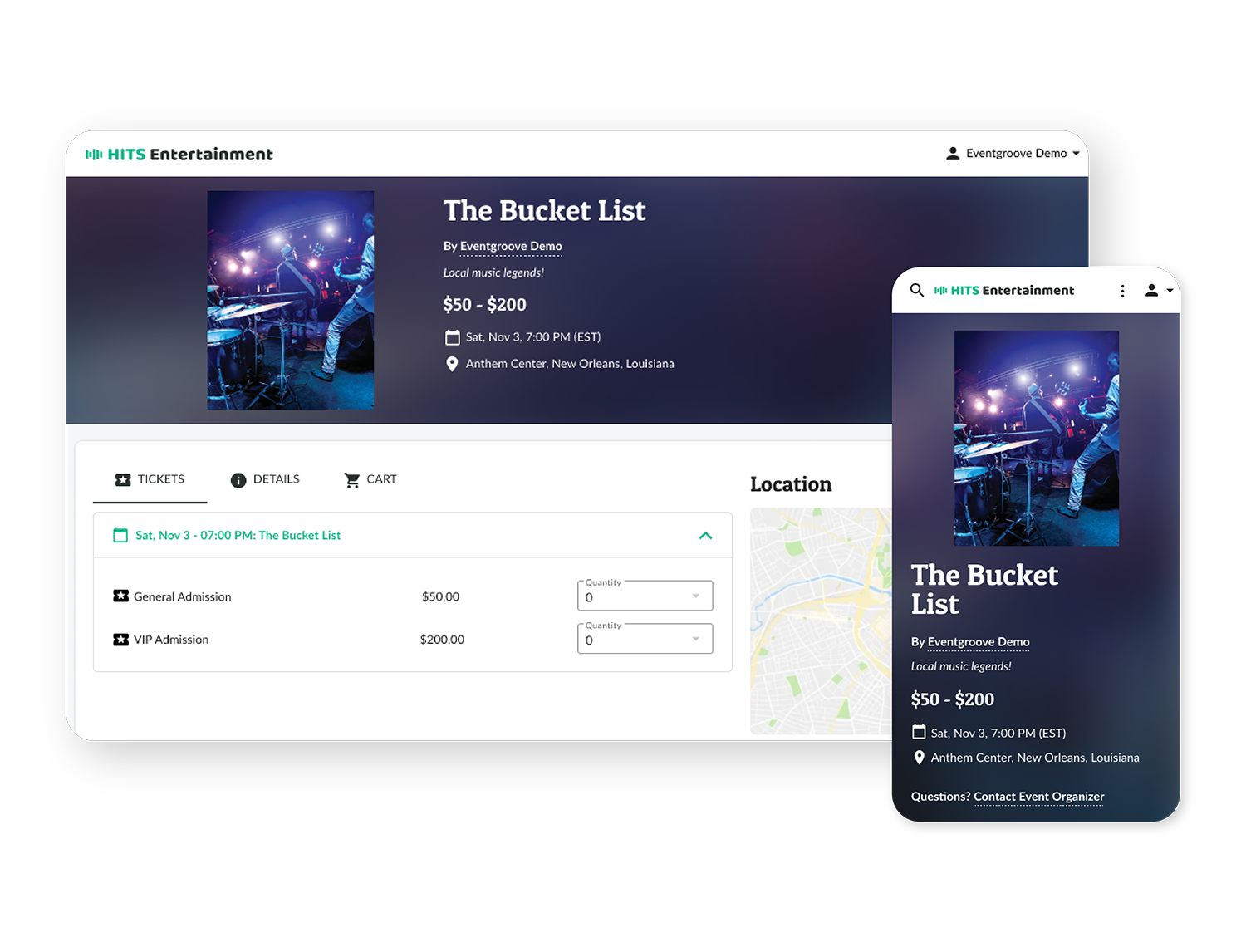
An event page through an event platform, however, can be accessed by anyone at any time. It can be personalized to represent your event, which lends your event credibility. Your event page is shareable on all social media platforms, mobile-optimized, SEO-friendly, and built for smooth online ticket sales. Plus, most platforms provide the data and analytics event hosts need to optimize their ticket sales and marketing efforts.
Make the Most of Your Online Event Ticketing Page
An event page is an effective tool for events and fundraisers of all sizes. It’s not just about promoting an event—it’s about creating a platform that resonates with your audience, reflects your brand, and contributes to a successful and memorable experience.

Great event page basics
As likely the first place people will interact with your event and also where you’ll conduct online ticket sales, your event page needs to represent your event and brand.
Be sure to have:
- Engaging visuals: Add your logo and take the time to include high-quality images and videos that evoke your event’s experience.
- Clear information: People want the facts, so make sure they’re easy to find. Provide information on the date, event location, pricing, schedule, guest speakers/performers, etc.—anything attendees would want to know. A side benefit of this is that the more text you include, the more information Google will crawl.

A strong visual brand
Keep your branding consistent, from your event page to social media to printed event tickets to the event itself.
What is consistent branding? MailChimp’s helpful article Establishing & Maintaining Brand Consistency defines it this way:
“Brand consistency means ensuring that the way you present your company—and what it stands for—remains the same across all your marketing channels, unifying the image and message your customers and potential customers see.”
Consistent branding from start to finish isn’t just about a unified, professional look and helping customers to recognize your event. It can impact sales. Marq’s State of Brand Consistency report states, “Consistent branding across all channels can increase your revenue anywhere between 10 and 20%.”
That’s not small change!
As you put together your event page, take the time to add your logo, colors, and images so that it aligns visually with everything else attendees encounter. For more about event branding, review this HubSpot guide. It’s got some great examples and tips for developing your event’s brand identity.


SEO
Most ticketing platfiorms have built-in SEO features that automatically optimize your event page for search engines. But you can do even more to get search engine attention!
You can proactively draw organic traffic by using the right keywords in your content. For instance, if you’re hosting a jazz concert in Durango, Colorado, include those words in your copy more than once.
Using search terms relevant to your event is another way you can enhance your event page’s SEO.
To start, simply Google “Jazz concert in Durango, Colorado” and see what terms pop up in the descriptions and titles of top-ranking pages. Do these sites use the term ‘concert’ or ‘performance’? What other words seem to be common? Next, avail yourself of free keyword research tools or use ChatGPT.
For more information about using those tools and choosing keywords, read The 9 Best Free Keyword Research Tools and How to Do Keyword Research for SEO.

Mobile optimization
Around 50% of web traffic comes from mobile devices, and if you advertise your event using posters with QR codes, your online ticket sales site will be hopping. You want it to be easy for visitors to buy tickets and get event information using their phones.
The good news is that mobile optimization is built in when you use an event ticketing platform to create your event page!
A user-friendly, secure, and smooth ticket-purchasing experience is vital. Make sure it’s easy for visitors to buy tickets by offering several payment options and that each transaction is secure. For example, Eventgroove is integrated with Stripe, enabling people to buy event tickets with any major credit card.

Ticket types
If you’re offering general admission, VIP, or multi-day passes, make the differences clear. Be sure to list the benefits of each ticket type on your event page and provide clear names at checkout. For example, instead of simply listing “Ticket Type A” or “Ticket Type B,” use names like “General Admission,” “VIP Access,” or “Balcony Seating.”
When attendees know exactly what they’re getting, they are more likely to have a positive experience. Ambiguities can lead to unmet expectations, which can impact your event and brand’s reputation.

Analytics
Make the most of your marketing and ticket bundling efforts with data. By knowing what ticket type or bundle earns the most conversions or how visitors are finding your event website, you can make better marketing decisions. For example, if you’re advertising on different social media platforms, knowing which produces more traffic can inform your next ad buy.
Ticket discount codes are another area where data is helpful. Using your platform’s reports, you can assess how effective each code is.
Ready to get started? Our event ticketing platform simplifies selling tickets online and managing your event. We’re equipped with all the tools you need, including easy-to-build event pages, built-in marketing tools, and more. Plus, if ever you need help, our Montana-based team is happy to assist. Plus, when you use our platform, you can access our online printing services, making ordering printed event tickets a snap. Start selling tickets online now!



0 Comments